Board / script / camera / recorder
PRESENTER WORKSPACE / DESKTOP WEB
Excalicord
Bringing whiteboard, script, references, camera, recording frame, and project sync into one desktop explainer workspace.
- Role
- Product designer and design engineer (recording workflow / GitHub sync)
- Time
- 2026 · production prototype, ongoing
- Platforms
- Desktop Web / React / Excalidraw / GitHub
The canvas holds ideas; the workspace makes them explainable, recordable, and maintainable.
01 / Context
Not another whiteboard
The real scenario is drawing while explaining, with scenes, script, references, camera, and recording active together. Individual tools exist; the workflow does not.
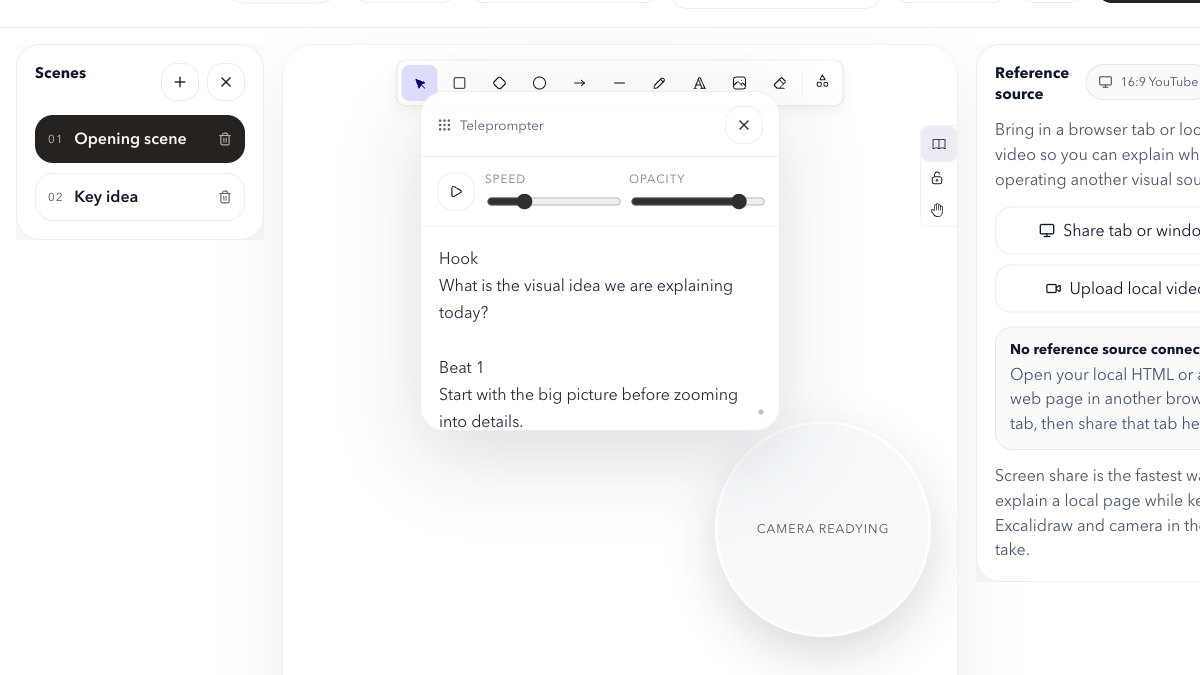
The main canvas stays clear while script, references, camera, and recording frame enter on demand.
02 / Framing
Turn window switching into spatial organization
The product boundary follows the job of explaining something, not a generic canvas feature list.
Frame / explain / record / sync
The problem was not missing tools, but an explainer flow broken across windows.
03 / Decision
The canvas is the stage; support layers can leave
- Scenes, teleprompter, reference panel, camera bubble, and recording frame enter only when needed.
- Desktop-first, without pretending the recording workflow belongs on mobile.
Switchable frames
Speaking rhythm
External context
Presenter presence
Visible boundary
Support layers orbit the explaining action and remain hideable and focusable.
04 / Flow
From explaining clearly to keeping the work
Frame → Explain → Record → Sync turns a live explanation into a project that can be edited, restored, and reused.
From framing to a project that remains editable
The explainer produces not only video, but scenes and a maintainable project.
05 / Recovery
Sync is not an upload button
GitHub configuration, push, pull, restore, and stale-client protection together define recoverability.
Private sandbox / stale-client conflict protection
A real private sandbox verifies push, pull, restore, and stale-client conflict protection.
06 / Delivery
Release claims need layers
Local tests and the production canary provide strong evidence. Preview reachability was blocked, so production success is not presented as universal infrastructure health.
Tests, build, browser smoke, and production canary passed; preview reachability remains a separate gap.
Experience in depth
Pain points, user stories, and interaction design
Not a tech stack section. This is about the situation people are in, where they get stuck, and what I did about it.
My pain points
Every project here starts from somewhere I personally got stuck.
- P01
Every product explainer meant running five windows at once: whiteboard, teleprompter, reference page, camera, and screen recorder.
- P02
The one second spent switching windows breaks the rhythm — and the audience drops with it.
- P03
After recording, drafts, assets, and the video end up scattered, so the next revision starts from zero.
- P04
An infinite canvas is great for divergence but bad for explaining: by the end of a dense board, nobody can find the point.
- P05
Browser recording, camera permissions, and local draft sync all keep their state in different places, so every session starts with a checklist.
User stories
Written as "as … I want … so that …", each mapped to a verifiable product action.
- US01
As someone recording an explainer, I want to draw, talk, and read the prompter in one surface, so I never switch windows mid-sentence.
- US02
As someone explaining structure, I want to split a session into switchable scenes, so the audience always knows where we are.
- US03
As someone citing material, I want a reference panel pinned next to the canvas for a page or local video, so I can talk and compare at once.
- US04
As someone who reuses work, I want to push the scene structure and project files to my own GitHub repo, so the next version is an edit, not a rebuild.
- US05
As someone on camera, I want the camera bubble and the recording frame controlled in the same layer, so I can confirm state before hitting record.
Experience journey
In real usage order: what they are doing, where it hurts, how the product responds.
StageWhat they are doingFrictionProduct response
01Frame
Before speaking, breaking the explanation into scenes.
On an infinite canvas the audience loses focus halfway through.
A scene list splits one explanation into switchable frames instead of a single endless board.
02Explain
Talking over the main canvas with prompter and reference alongside.
Permanently visible helper panels steal attention from the canvas.
The helper layer is arranged around the act of explaining: collapsed by default, summonable, focusable, never the visual lead.
03Record
Selecting the recording frame, enabling the camera bubble, starting the take.
Permissions, devices, and recording bounds live in different places, so it is easy to capture the wrong thing.
Frame selection, camera, and screen share are controlled in one layer with a visible boundary and readable state.
04Sync
Pushing the project state back to a personal repository after recording.
Record-and-scatter turns every session into a disposable artefact.
GitHub push / pull / restore against a configured repo, branch, and path, with stale-client conflict protection.
Interaction details
The micro-decisions that make it feel fluid or clumsy.
- Helpers collapsed by default
- Prompter, reference panel, and camera bubble appear only when needed instead of permanently crowding the canvas.
- Visible recording bounds
- The recording frame is independent of the window, so what will be captured is clear before recording starts.
- Scene switching does not interrupt
- Switching scenes is an in-product action rather than a window switch, keeping the delivery continuous.
- Mobile explicitly declined
- On a mobile device the product asks for a desktop instead of shipping a degraded experience.
- Sync with conflict protection
- Stale-client conflicts are caught and surfaced rather than silently overwriting the remote.
Design details
Tradeoffs in the visual system, state language, and pacing.
- Desktop first
- Recording, dragging, scene switching, and reference video all need a stable large canvas, so mobile does not get to dictate the layout.
- No canvas rebuild
- A mature whiteboard core stays underneath; the value is added in the presenter layer, not in cloning a drawing tool.
- Presenter workspace semantics
- Scope decisions are judged by one question: does this step serve the explanation?
- Restrained hierarchy
- Helper surfaces use lower contrast and smaller scale so they never compete with the canvas.