按摩 / 厨具 / 游泳散落多处
PERSONAL FINANCE / PRIVATE PRODUCT
Money
Turning years of real bookkeeping habits into a private, local-first, cross-device product that can be recovered.
- Role
- Product designer and design engineer (service architecture / data migration)
- Time
- 2026 · 24h first release, ongoing
- Platforms
- Mobile Web / Desktop Web / PWA
One track handles daily recording. The other keeps the data owned and recoverable.
01 / Context
Not another expense UI
The real problem was moving years of private data out of a closed tool while preserving fast mobile entry, desktop analysis, and long-term recoverability.
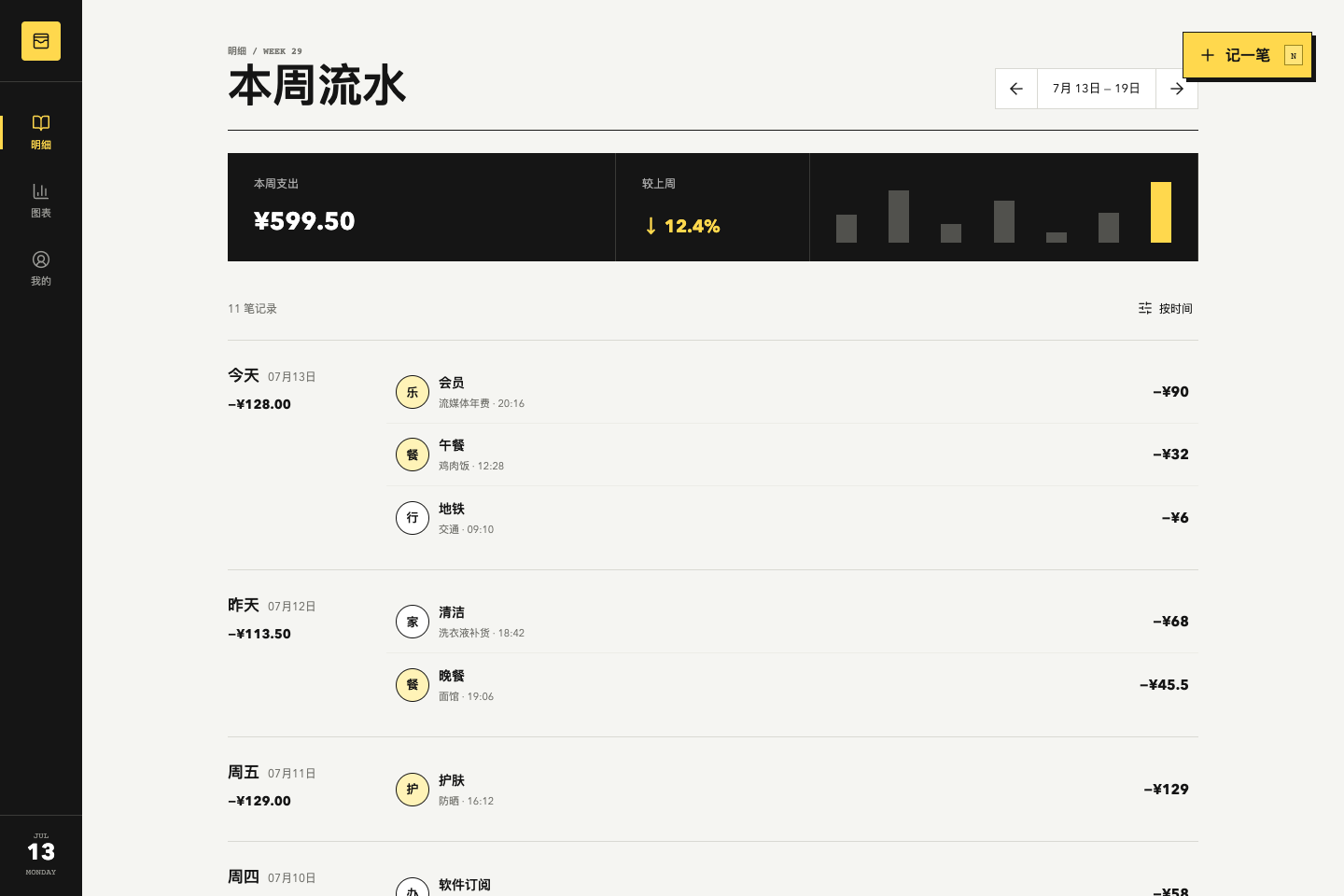
The early demo established the visual direction, but data, sync, and history were still simulated.
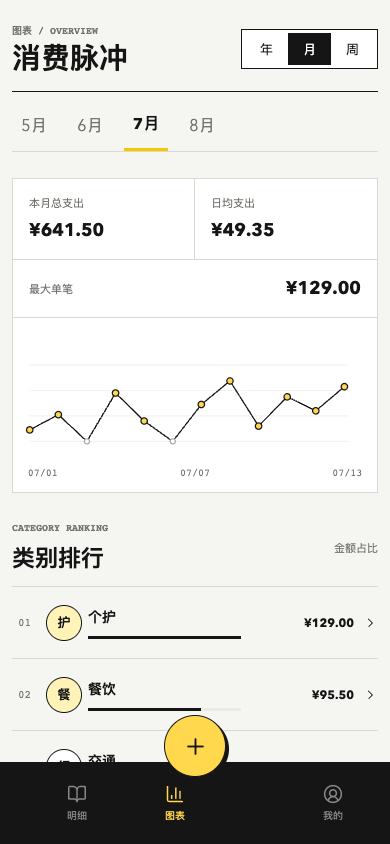
The early mobile chart validated the monochrome-yellow language while exposing crowded periods and weak state feedback.
02 / Framing
Fix the taxonomy before the entry flow
- Categories represent spending domains; subcategories represent concrete items.
- One home per item reduces hesitation and analytical noise.
一个事项,一个稳定归属
The taxonomy moved from mixed contexts, objects, and behaviors to twelve spending domains.
03 / Decision
One PWA, two densities
- Mobile handles fast entry, search, and refresh.
- Desktop handles period analysis, drill-down, and organization.
- No native app and no premature offline-write conflict system.
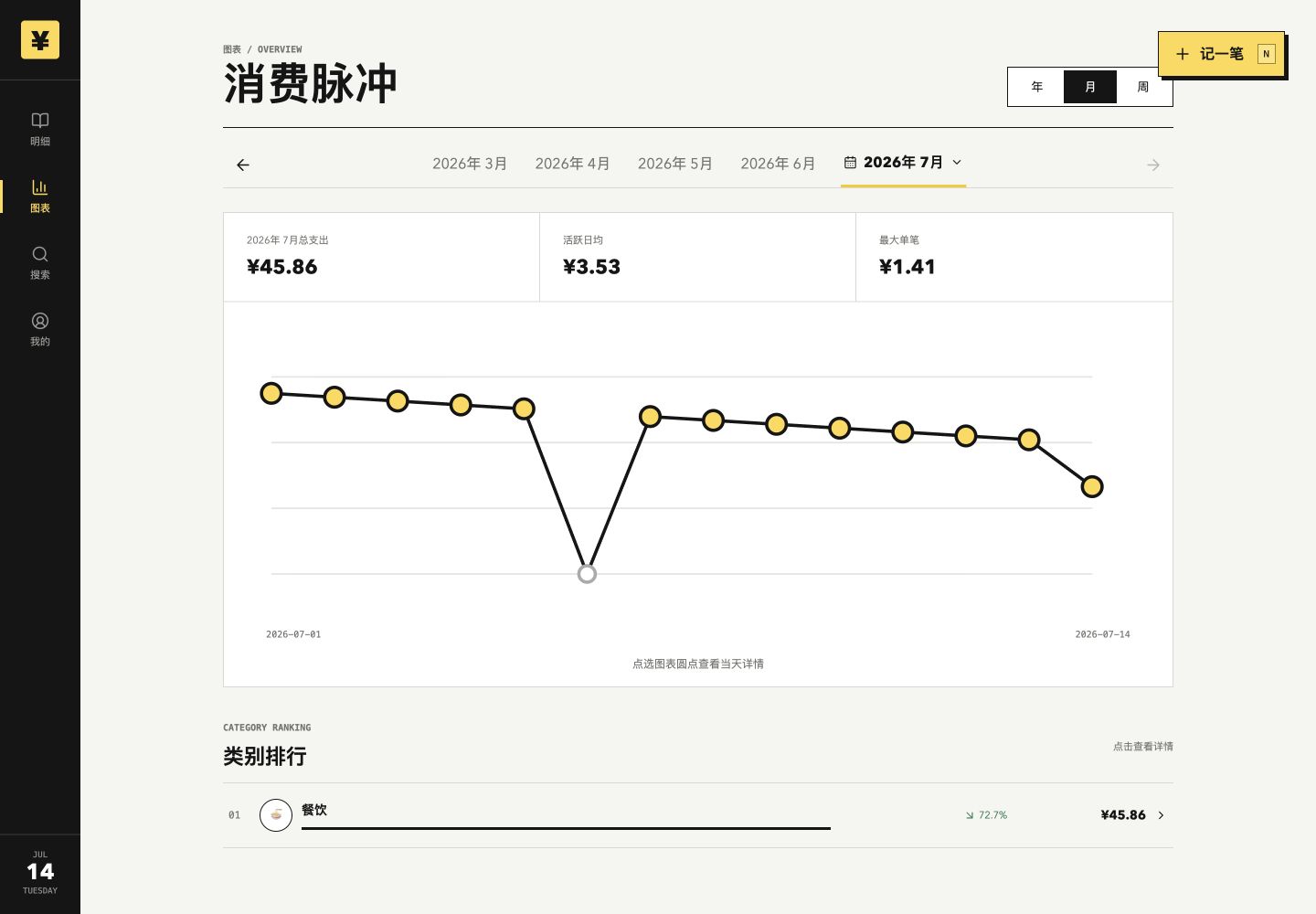
Desktop keeps period decisions, trend, and category drill-down in one workbench.
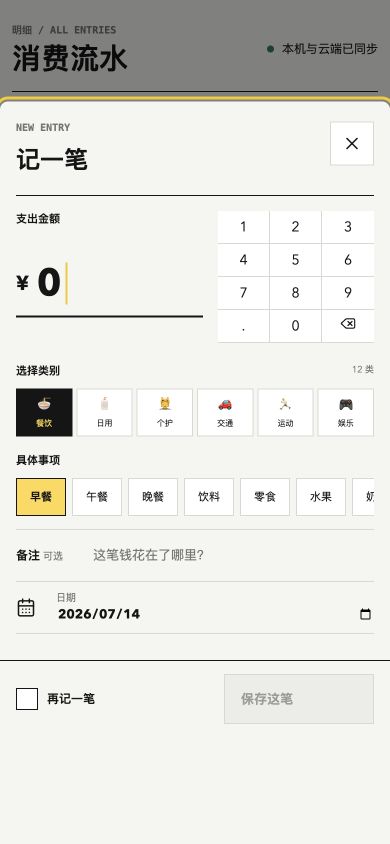
Recording is a global action; amount, category, item, and date stay in one bottom-sheet flow.
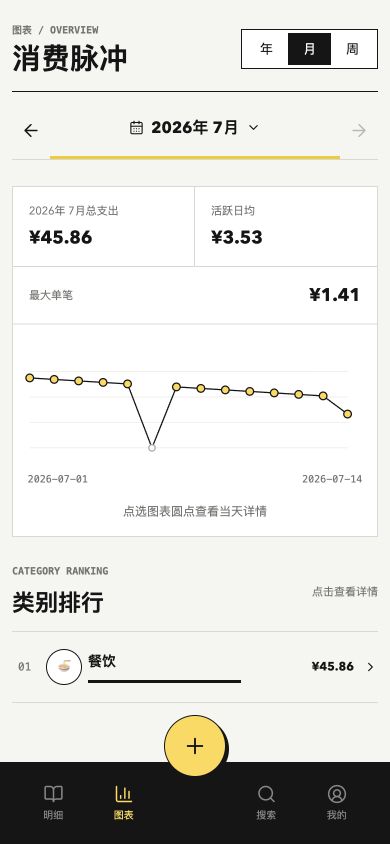
Mobile keeps the same analytical logic while showing only the period and metrics needed for the current decision.
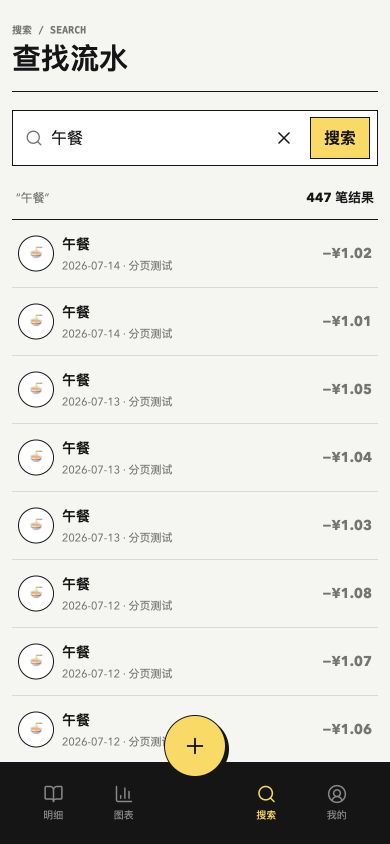
Search spans notes, concrete items, and categories, progressively traversing full history with stable cursors.
D1 preserves truth while IndexedDB makes historical content immediately available on-device.
04 / System
Immediate locally, truthful in the cloud
Private structured data stays out of the service-worker HTTP cache. IndexedDB handles local reads; Worker and D1 own authentication and truth.
先显示本机历史,后台静默校验;退出即清除私人缓存。
Read locally, validate in the background, and clear private caches on logout.
幂等写入
主库读取
周期查询
鉴权生成
备份校验
USER / FRONTSTAGE / BACKSTAGE
Entry, sync, analysis, export, and recovery are treated as one service chain.
05 / Iteration
Real use exposed the feeling of waiting
Mobile slowness was not just API latency. Fixed periods, repeated network reads, and oversized loading states amplified loss of control, leading to full-history cursors, local-first reads, and in-place feedback.
大型 spinner
原位进度与低对比骨架
Large spinners gave way to in-place progress and quiet skeletons.
06 / Delivery
Done means the data can come back
- Real auth, CRUD, search, export, and category management.
- Migrations, backup, restore, and release smoke checks.
- A private product with no public registration or invented commercial proof.
Tests, migrations, export, backup, and restore define what done means.
Experience in depth
Pain points, user stories, and interaction design
Not a tech stack section. This is about the situation people are in, where they get stuck, and what I did about it.
My pain points
Every project here starts from somewhere I personally got stuck.
- P01
Years of ledger data locked inside a closed app: no real export, no way to change how it works, and switching devices meant starting over.
- P02
Logging one expense took account, category, subcategory, amount, and confirm — impossible to finish standing at a checkout counter.
- P03
Answering "how much did dining cost last month, and which transactions were they" meant jumping between a report page and a list page.
- P04
The old category system mixed situations with objects ("takeout" next to "food"), so every entry required a small decision.
- P05
A cloud ledger means my real financial data lives on someone else's server. I was not willing to accept that.
User stories
Written as "as … I want … so that …", each mapped to a verifiable product action.
- US01
As someone at a checkout counter, I want to log an expense in seconds and see it in today's ledger immediately, so I never have to reconstruct it later.
- US02
As someone doing a monthly review, I want to drill from year / month / week trends into the actual transactions, so I can see where the money really went.
- US03
As someone who only remembers a vague impression, I want keyword search across all historical notes, so "that shop last time" is enough to find the entry.
- US04
As the owner of this data, I want to export and restore the full ledger at any time, so a broken system never costs me years of records.
- US05
As a multi-device user, I want mobile for capture and desktop for organizing, so each device does what it is good at.
Experience journey
In real usage order: what they are doing, where it hurts, how the product responds.
StageWhat they are doingFrictionProduct response
01Capture
Standing in a shop, one hand on the phone, a few seconds to record the expense.
Most tools need five steps before the entry is stored, and a standing user abandons halfway.
Capture is the top mobile priority: amount first, idempotent writes so a flaky-network retry never doubles the entry.
02Sync
Logged on mobile, continued on desktop in the evening.
Full-screen loading breaks the rhythm of logging several entries in a row.
No full-screen loaders. Progress becomes a quiet inline indicator, and IndexedDB serves stale-while-revalidate so local content appears first.
03Review
End of month, trying to understand where the money went.
Reports and transaction lists usually live on separate pages, so an anomaly is not clickable.
Year / month / week trends stay continuously drillable into categories, dates, and transactions — every number opens into the entries behind it.
04Search
Only "that shop last time" is remembered — no amount, no date.
Category browsing is useless against fuzzy memory.
Global keyword search spans notes, subcategories, and categories, with stable cursor pagination for progressive loading of full history.
05Own
Checking that the system will not hold the data hostage.
Exports from closed tools are usually partial, so switching tools means losing history.
Export, backup, restore, and migration stay part of the release flow; the live app keeps private login with no public signup.
Interaction details
The micro-decisions that make it feel fluid or clumsy.
- Amount first
- The entry screen opens with the cursor in the amount field and a numeric keypad; the category defaults to the previous choice.
- No full-screen loading
- Loading is carried by thin inline indicators. Content always arrives before progress.
- Idempotent writes
- Every submission carries an idempotency key, so retries and double taps never create a second entry.
- Local answers first
- IndexedDB uses stale-while-revalidate so transactions, charts, search, and category detail render instantly on-device.
- Stable cursor pagination
- Full history and search results load progressively without shifting a list that is already being scrolled.
- Split by device
- Mobile only carries capture; category management, export, and bulk edits happen on desktop.
Design details
Tradeoffs in the visual system, state language, and pacing.
- Monochrome workbench, one accent
- The black-and-white workbench continues, with yellow reserved for capture, selection, and sync states — never decoration.
- Integer cents
- Amounts are stored and rendered as integer cents to avoid float drift, set in tabular figures for vertical scanning.
- Rebuilt taxonomy
- The old mixed taxonomy became 12 spending domains with single-parent subcategories, removing same-level ambiguity.
- One visual system across depth
- Charts and lists share a single scale and typographic rhythm so drilling from trend to transaction never breaks visually.
- Two densities
- Mobile enlarges touch targets for one-handed reach; desktop raises information density for analysis and bulk work.